
A washer door that stays shut doesn’t always mean the latch has failed. If your washing machine door won’t open in Ottawa, make sure the cycle has ended, turn the machine off, wait 2-5 minutes, then turn it back on. Repair time depends on the cause: a temporary issue differs from a faulty latch or control problem.
It’s frustrating to have laundry trapped inside, especially when you don’t know whether the washer is still draining or needs repair. Don’t pull hard on the door. First, check whether water remains in the drum and whether the door-lock indicator is lit.
This guide shows you how to check the indicator, try safe troubleshooting steps and recognize when the problem may need professional diagnosis. You’ll also learn what affects a repair-time estimate, so you can make a calmer, more informed decision.
Key Takeaways
- Check for a faulty latch, misaligned strike or control issue to understand what may be behind the locked door.
- If water remains in the drum, try Drain/Spin and follow the washer’s safe draining steps before testing the door again.
- Use the door-lock indicator as a clue about whether the washer has drained, and check your model’s manual for what the light means.
- After the cycle ends, turn the washer off and wait 2-5 minutes before turning it back on and trying the door.
How long does a typical washer repair take?
Professional diagnosis is appropriate if the latch is physically damaged or the interlock behaves inconsistently. The problem may involve internal wiring or safety circuits, not just the door handle.
- Check the latch and strike. Look for visible debris around the door opening, then close the door firmly without slamming it. The strike is the part that meets the latch; if it looks bent or out of alignment, the door may not engage properly. Don’t force the door open or try to bend the strike back.
- Try the safe controls first. Press Pause/Cancel and allow the washer to respond. A door that stays locked after the cycle may point to a latch issue or a control-board problem. If you suspect a temporary sensor or control lock, disconnect power for 3-10 minutes, or switch off the breaker, then restore power and test the controls again.
- Note the symptoms and any code. Record whether the latch clicks, whether the washer starts, and whether the problem comes and goes. DL, DLO and DLU can indicate a door-lock mechanism or lock-switch issue. Washer error codes may point to a door-lock or switch issue, but their meaning can vary by model. E41 and E42 may relate to a door lock or switch, depending on the brand. Check the model manual for the code’s exact meaning.
- Leave internal latch work to a technician. Replacing a latch or interlock switch can involve wiring and safety circuits. A technician can determine whether the latch, misaligned strike or control board needs attention, then test the washer’s operation after the repair. The estimate depends on the fault identified and the repair steps required, so a single time estimate doesn’t fit every locked-door problem.
Unbalanced loads and drainage problems
- Check whether the load shifted. Heavy items, such as towels, can bunch together and throw the washer off balance during spinning. Some models stop or pause to protect the drum. Wait for the cycle to end, then redistribute the laundry evenly. If the drum is still full of water, don’t pull the door open; the washer may be keeping it locked until draining finishes.
- Try Drain/Spin. Select this cycle if water remains in the drum, and let the washer attempt to pump it out. Watch for water movement and listen for the drain pump. If the water level drops, the door may release once the cycle ends. If the washer doesn’t drain, note any displayed error code and check the model manual for its meaning.
- Prepare before manual draining. If Drain/Spin fails, turn the washer off and disconnect its power before using an emergency drain access. Follow the model’s instructions, since access and draining methods differ. For a Samsung washer with an emergency drain hose, place a bucket or container underneath first. Water may come out quickly, so empty the container as needed and keep the area around the washer dry.
- Reassess after the drum is empty. If draining lets the door open, rebalance the load and run an appropriate cycle. If water remains, the washer stops draining again, or the door stays locked, the cause may involve the drain system or a sensor. Repeated failure calls for diagnosis rather than repeated attempts to force the door. For a persistent problem, washer repair service can help identify the fault.
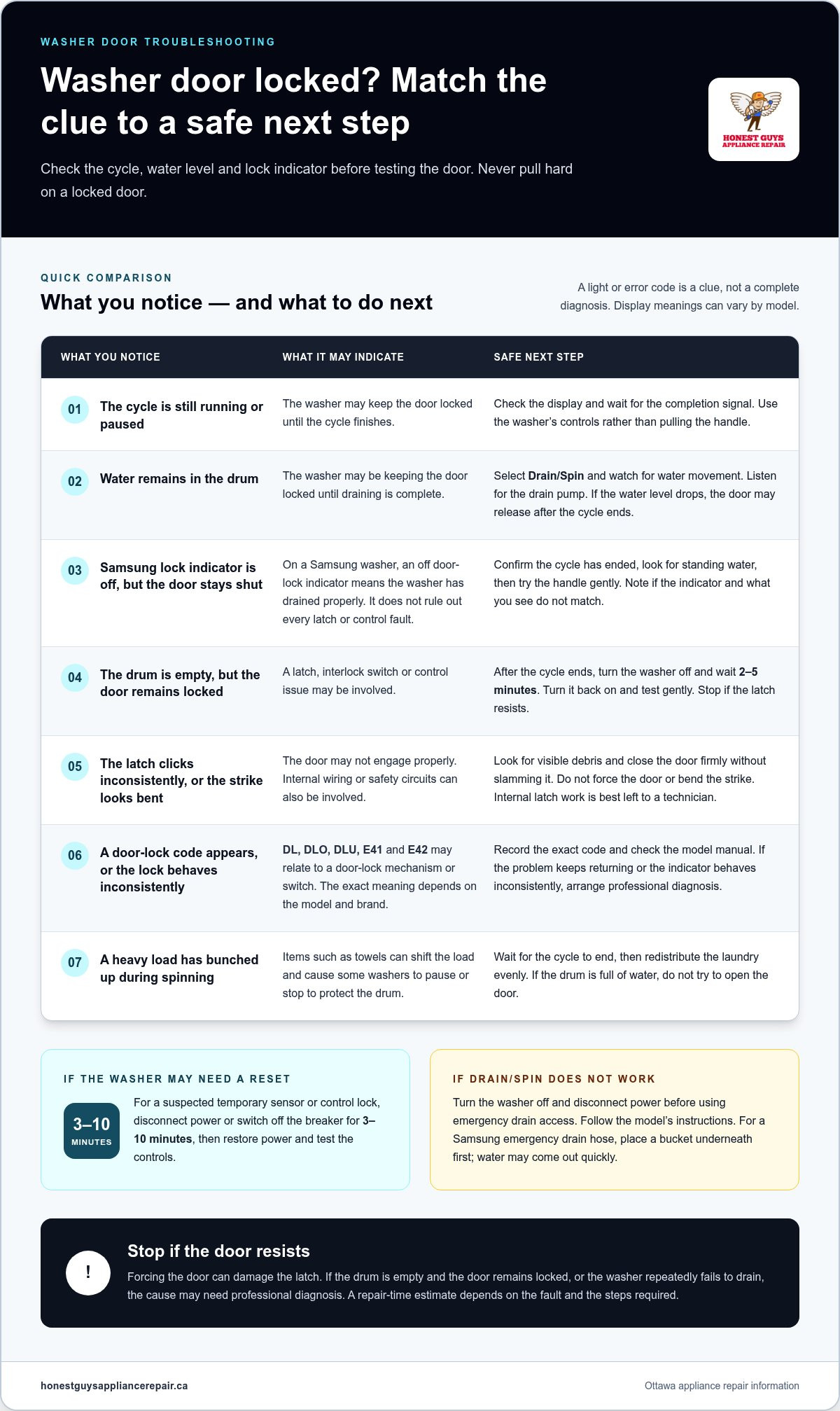
Checking the door-lock indicator
- Find the indicator before changing settings. Look at the washer’s display and control panel for a lock symbol or door-lock light. Some models show a lit icon while the door remains locked; others use a message or different symbol. Check the model manual to identify the indicator accurately. Don’t assume every washer uses the same display.
- Read the light alongside the cycle status. Confirm whether the wash or spin cycle is still running, paused, or finished. A lit lock indicator during an active cycle can be expected. Wait until the cycle ends before testing the handle. If the display still shows a running cycle, use the washer’s controls rather than pulling the door.
- Use a Samsung indicator as a drainage clue. On a Samsung washer, an off door-lock indicator means the washer has drained properly. If the light is off but the door stays shut, note that difference. Check whether the cycle has fully ended, then try the handle gently. The light helps assess drainage, but it doesn’t identify every possible latch or control fault.
- Compare the display with what you can see. Look through the door for standing water and note any error code. A lit indicator with water in the drum points to an incomplete drain or cycle. An off indicator with an empty drum but a stuck door suggests a different issue may be involved. Record the exact display message for later diagnosis.
- Inspect the indicator after a reset. If you restore power after a temporary interruption, watch whether the lock symbol changes as the washer restarts. Don’t repeatedly switch power or force the latch. If the indicator stays on after the cycle ends, or behaves inconsistently, use the model manual to interpret it. The indicator is one clue, not a stand-alone diagnosis.
How long should you wait for a washer door lock to release
- Confirm the cycle has ended. A washer may keep its door locked during an active cycle or before the cycle fully finishes. Check the display and wait for the completion signal. Samsung doors can take a short time to release after the cycle ends. Don’t pull the handle while the washer is still operating.
- Wait 2-5 minutes after switching the washer off. If the cycle has ended but the door remains locked, turn the machine off and wait 2-5 minutes. Then turn it back on and try the door gently. This pause gives the washer time to reset its lock response. Stop if the latch resists; pulling can damage it.
- Allow time after pausing a Samsung washer during filling. If you paused the machine while it was filling with water, wait at least one minute before trying the door. The water level and cycle state can affect whether the lock releases. Check the display and look for water through the door before testing the handle.
- Account for an interruption or safety stop. A mid-cycle power interruption or an unbalanced-load stop can leave the door locked. Restore power, check the displayed cycle status, and let the washer complete its response before trying again. If water remains in the drum, the washer may retain the lock until draining finishes.
- Try a power reset only for a suspected temporary control issue. Disconnect the washer for 3-10 minutes, or switch off its breaker, then restore power. Use the controls to check the cycle status before touching the door. If the washer remains locked after this reset, or repeats the problem, note the symptoms and model details for diagnosis.
Honest Guys Appliance Repair: Dryer Repair
If your washer door stays locked after safe checks, Honest Guys Appliance Repair provides washer repair to identify the fault and determine the next step. Arrange service if the washer remains locked after draining and resetting, or if the latch behaves inconsistently. Don’t force the door or attempt repairs involving internal wiring.
Share the washer’s model, any displayed error code, and what you observed: whether water remained in the drum, how the lock indicator behaved, and when the problem began. These details help describe the issue clearly. Honest Guys Appliance Repair also repairs dryers, fridges, ovens, and stoves.
Contact Honest Guys Appliance Repair or visit honestguysappliancerepair.ca to discuss your appliance repair needs.
Choose a clear next step for your washer
If the washer door remains stuck after safe checks, don’t force the latch or keep repeating resets. A recurring problem deserves attention before another load gets trapped. A washer repair assessment can help identify whether the fault is in the door mechanism or another component.
Consider how the fault affects your household routine and what you need the washer to do. Sharing that context can keep the repair discussion focused on practical options rather than guesswork. Choose a next step that addresses the recurring issue and helps restore your usual laundry routine.
For help with a washer problem, contact Honest Guys Appliance Repair. A clear next step can make laundry feel manageable again.
Frequently Asked Questions
Repair or Replace?
Repair may make sense if the washer has one identifiable problem and otherwise suits your household. Replacement may be more practical if faults recur or the machine no longer meets your needs. Consider its overall condition, reliability, and the technician’s diagnosis. A single door-mechanism fault, for example, differs from repeated problems affecting several washer functions.
How can I open a washing machine door manually and safely?
Follow the manual for your washer’s exact model before trying a manual release. Use only the steps it describes, and don’t remove panels or reach inside the cabinet unless directed. Keep the area dry and stop if the release resists. If you can’t identify the correct procedure, leave the door closed and arrange washer repair.
Why does a washing machine door stay shut after a cycle?
The washer may not register that its program has ended, even if the drum appears still. The door-lock assembly may also fail to respond, or a control signal may not reach it properly. Note the display message and whether this happens after every cycle or only one program. That pattern can help describe the fault.
How do I use the emergency door release on a front-load washer?
Find the emergency-release instructions in the manual for your front-load washer. The access point and steps vary by model, so use only the method described there. Don’t pull unidentified cords or remove parts to reach a release. If the manual requires draining first, follow its instructions. Stop if the door resists.
Can I force open a stuck washing machine door without damage?
No. Pulling hard or using a tool can break the latch, bend the strike, or damage the seal. This may cause a larger repair and prevent the door from closing properly. Use the washer’s normal controls and model-specific instructions instead. If the handle won’t move with gentle pressure, stop and arrange an assessment.
Who can repair a washing machine door that stays shut in Ottawa?
Honest Guys Appliance Repair offers washer repair in the Ottawa region. When arranging service, share the washer’s make and model, the display message and whether the problem has happened more than once. These details can help describe the fault clearly. The company also repairs other household appliances, including washers and dishwashers.